A voice-first messaging app for Krafton
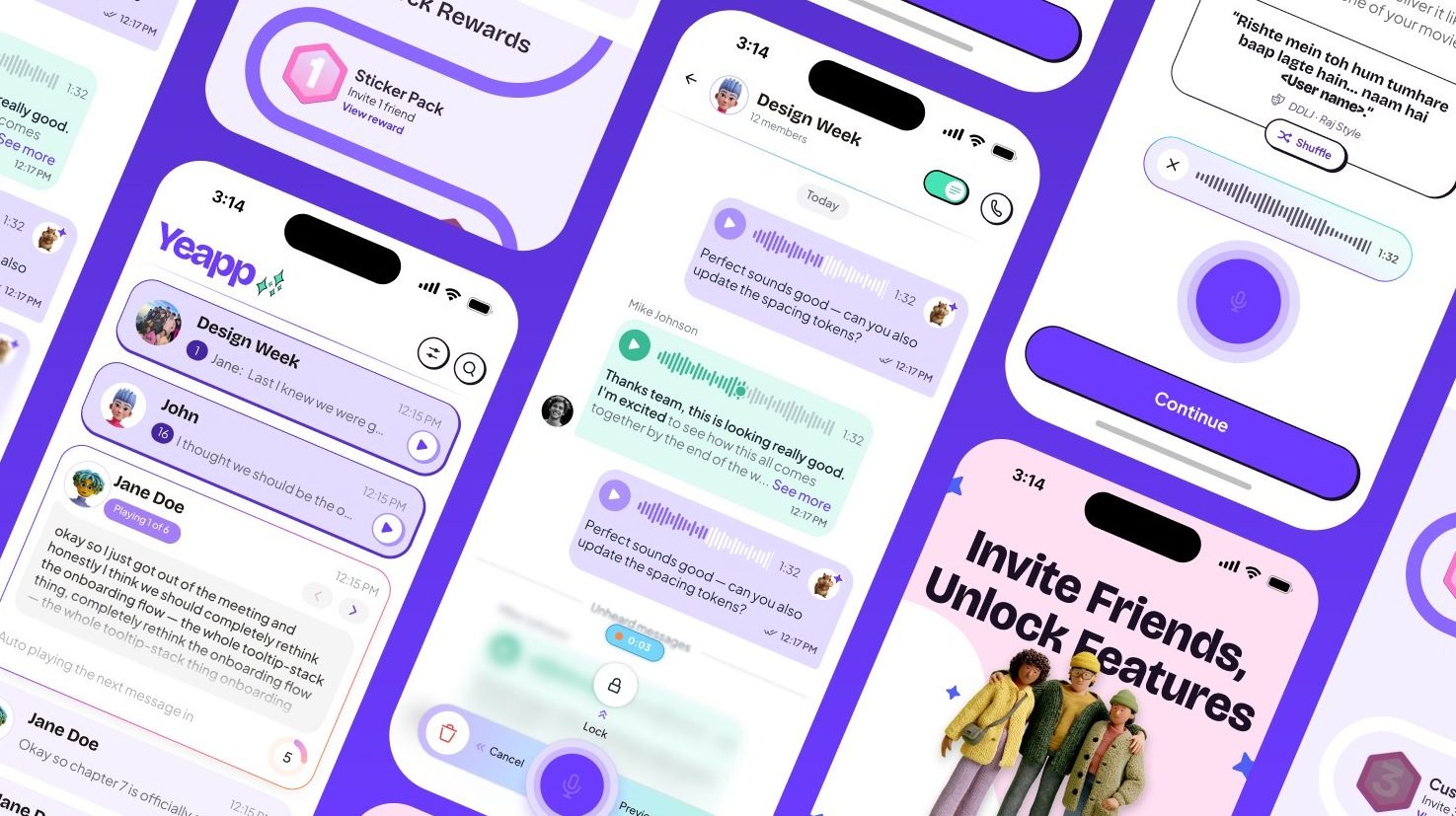
Yeapp lets young Indians talk instead of type. I led product design from a blank slate to the first release on Google Play in about 45 days: what the app does, how it works, how it looks, and the design system underneath.
- What is Yeapp?
- My role
What is Yeapp?
Yeapp is a messaging app built by Kinvrs, part of Krafton, the company behind PUBG. It is for Indian Gen Z, aged 16 to 24, in the big cities. Every message starts as a voice note, called a yeapp, and the app is organised around three ideas: express yourself with your voice, connect across languages, and stay engaged without typing.
When I joined, the brief was a feature list and a deadline. The name, the look, the core interactions and most product decisions were still open.
Why it was hard
Three things shaped every decision
Up against WhatsApp
Every friend group already has a messenger. Yeapp needed a reason to exist that WhatsApp could not copy in a week.
Voice is slow to take in
You can skim ten texts in a second. You cannot skim ten voice notes, so people put off listening.
45 days, nothing decided
Design had to run ahead of engineering, so the decisions that blocked the most work had to be made first.
People already send voice notes. Nobody had built a messenger that treats voice as the main event.
My role
I worked across product and design. With the product manager I shaped what went into the first release and wrote the rules for the core interactions. I designed the flows and screens, set the visual language and built the design system. Two junior designers joined partway through; after the first release one of them carried the work forward under my supervision.
Ownership
What I did
Product definition
Worked with the PM to rank features into tiers and lock how the composer and player behave.
Research and flows
Studied how voice notes are used today and mapped every flow, from sign-up to voice rooms.
Visual language and system
Set the brand look, type for Roman and Devanagari, and a component library built on variables.
Motion and handoff
Designed the animations, wrote specs engineers could build from, and led two junior designers.
- The question
- Problems
- Users
- Challenges
The question
How do you get people to choose voice, when typing is what they already know?
Voice notes already work. They just aren't built for.
Indians talk a lot. Friend groups already swap voice notes when typing feels too slow or too flat. But every messenger treats a voice note as an attachment to a text app. We listed what goes wrong when voice is an afterthought.
The problems
Four problems with voice notes today
You can't skim them
A pile of unheard voice notes is a chore. You have to listen in order, at full length, with no idea what is inside.
You think while you speak
Voice notes ramble because people work out what they mean as they talk. Text lets you edit. Voice does not.
You pick the format too early
Every app makes you choose text or voice before you know what you want to say.
There is no reason to switch
A new messenger is empty until your friends are on it, and voice alone is not enough to move a group.
Users
Who we designed for
Gen Z, 16 to 24, Indian metros
Friend groups
Chats where emotion matters and typing feels slow: plans, gossip, inside jokes.
Hinglish speakers
They mix Hindi and English mid-sentence and read Hindi in Roman letters, not Devanagari. Transcripts had to match how they read.
Budget Android, prepaid data
Most users are on mid-range Android phones and watch their data. Screens had to stay light and quick.
Key UX challenges
What the design had to do
Make voice skimmable
Let people get the gist of a voice note without pressing play.
Make recording as easy as typing
One thumb, no setup, and a way out if you fumble.
Give voice a reason
Add things you can only do with your voice, so it feels like play, not a chore.
Bring friends in
Make inviting someone feel personal, not like a download link.
- Phases
- Requirement to decision
- The happy path
Decide the hard parts first.
With engineering starting in week one, I sequenced the design so the decisions that blocked the most code came first: the composer, the player and the voice bubble.
Design phases
How the 45 days ran
Apr to Jun 2026
Pillars and tiers
With the PM, sorted every feature into foundation, wedge features that answer "why not WhatsApp", beta completion and later.
Core surfaces
Designed the composer, mini player, chat view and voice bubble first. Krafton called the voice bubble the core open design problem.
System and scaffolding
Built the design system, then onboarding, home, contacts, profile and settings on top of it.
Wedge, growth, handoff
Voice filters, emojis, stickers, rooms and invites, then handover notes on the voice bubble, composer and group decisions.
From requirement to design decision
Each need maps to one design move
- Skim voice
- A transcript on every yeapp. Words already heard are set heavier, so the text shows how far you got.
- Catch up fast
- One player per conversation that auto-advances to the next unheard yeapp, instead of play buttons on every bubble.
- Record with confidence
- Hold to talk for quick notes. Slide to lock for longer ones, then preview, delete or send.
- Choose voice on purpose
- Voice filters, and emojis and stickers that play a sound, all one tap from the composer.
- Bring friends in
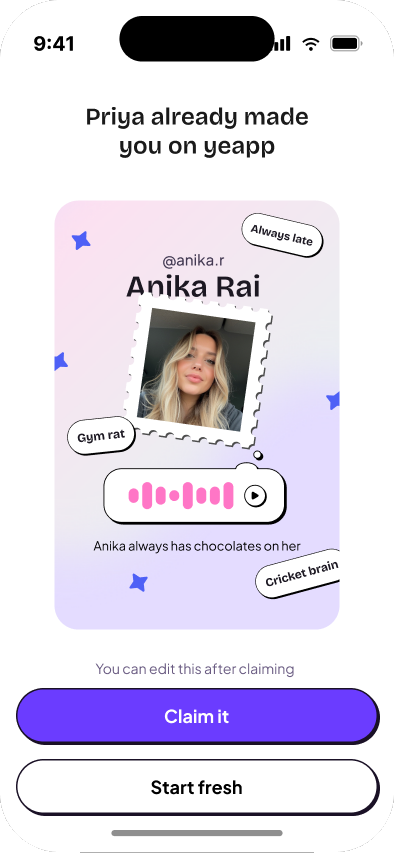
- Ghosties: a profile you build for a friend who is not on Yeapp yet, so their invite is about them.
The happy path
From download to first yeapp
First session
- 01Sign up with phone and OTP
- 02Pick a name and photo
- 03Meet Ziggy, a guide in a real chat
- 04Send a first yeapp, with a filter
- 05Sync contacts and see who is here
- 06Invite a friend with a Ghostie
- Listening
- Recording
- Expression
- Growth
04 A
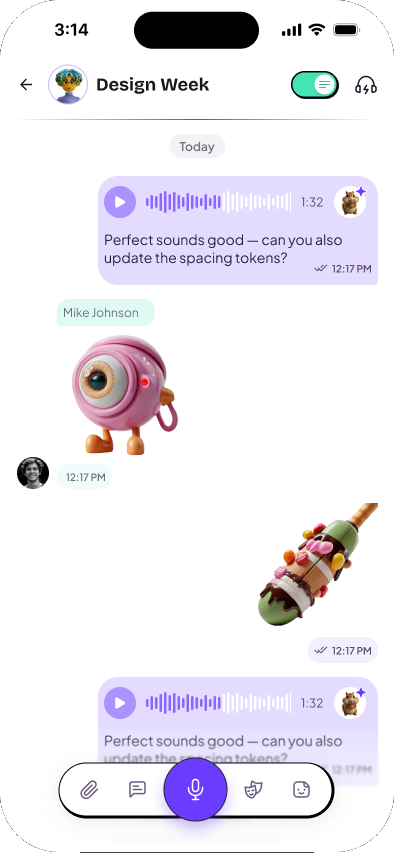
Make listening as fast as reading.
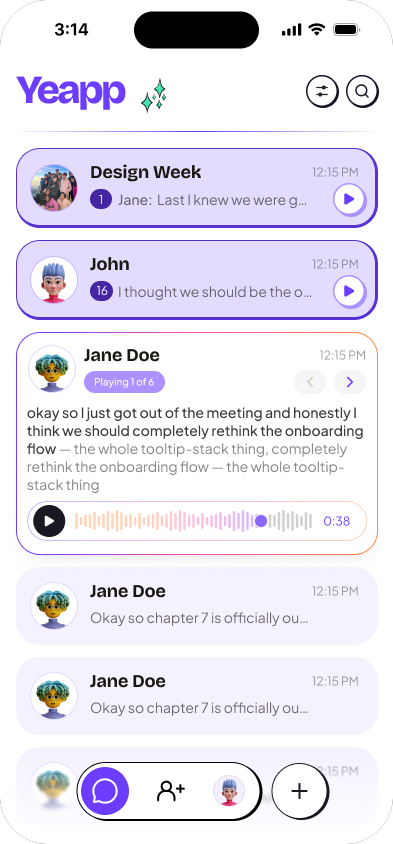
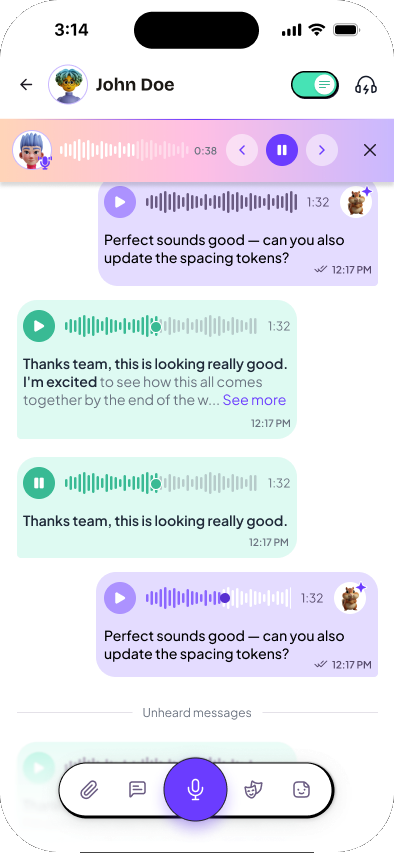
The home screen and the chat are built around catching up, not around pressing play.
- 01
Auto-play on home
Unheard yeapps play in place, chat after chat, so you can catch up without opening each one.
- 02
A transcript on every yeapp
Read first, listen if you want. Heard words turn bold, so progress lives in the text instead of a separate chip.
- 03
One player per chat
The current yeapp pins to the top as you scroll and moves on to the next unheard one by itself.
04 B
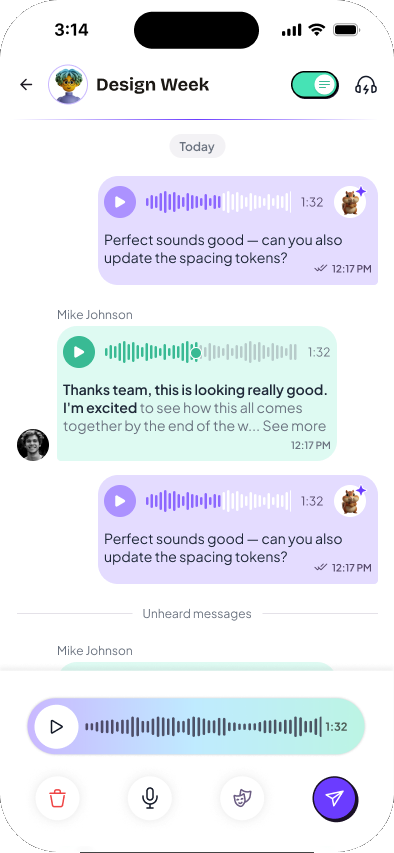
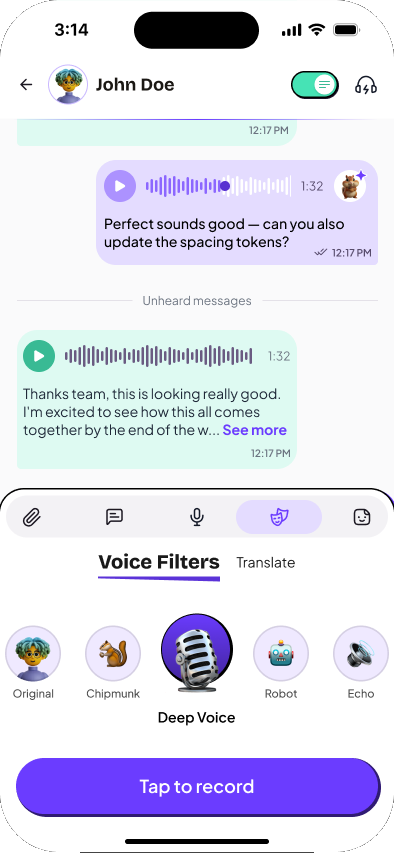
Make recording as easy as typing.
Recording had to work one-handed, for a two-second reply or a two-minute story.
- 01
Hold to talk
The quick path for "running late". Let go and it sends.
- 02
Lock for longer notes
Slide up to lock, put the phone down, and keep talking.
- 03
Preview before sending
Listen back, re-record or delete. Nothing goes out by accident.
04 C
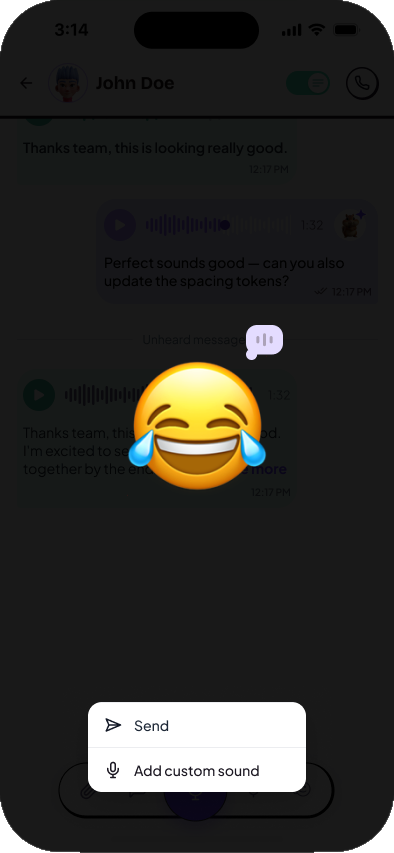
Give people a reason to use their voice.
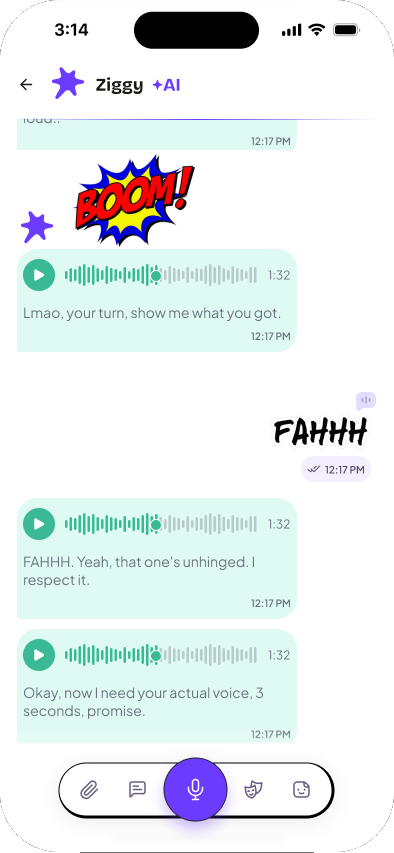
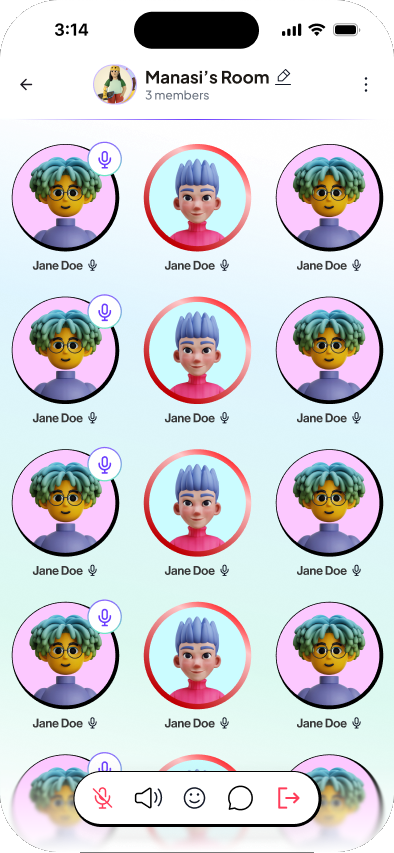
These are the wedge features: things WhatsApp does not do, built for how this audience jokes around.
- 01
Voice filters
Chipmunk, deep voice, robot or echo, previewed on your own voice before sending.
- 02
Emojis and stickers with sound
They play out loud when they arrive. Long-press to record your own sound for one.
- 03
Voice rooms
Drop into a live call from any chat, with reactions and a side chat for people who cannot talk.
04 D
Make the first minute, and the first invite, personal.
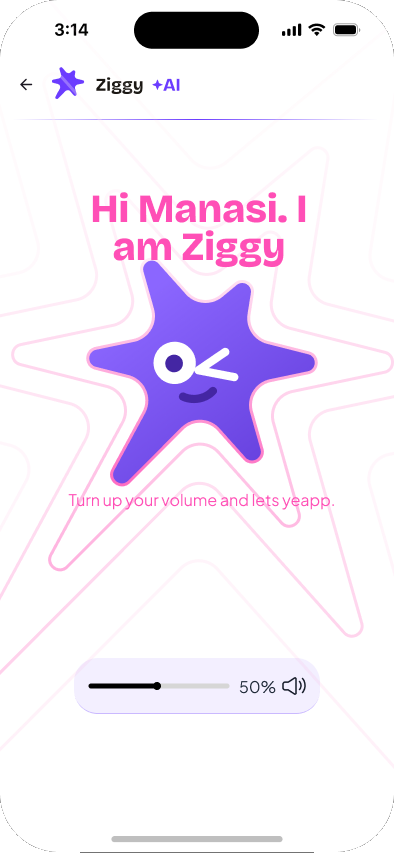
An empty messenger is useless, so onboarding and invites got as much design as the chat.
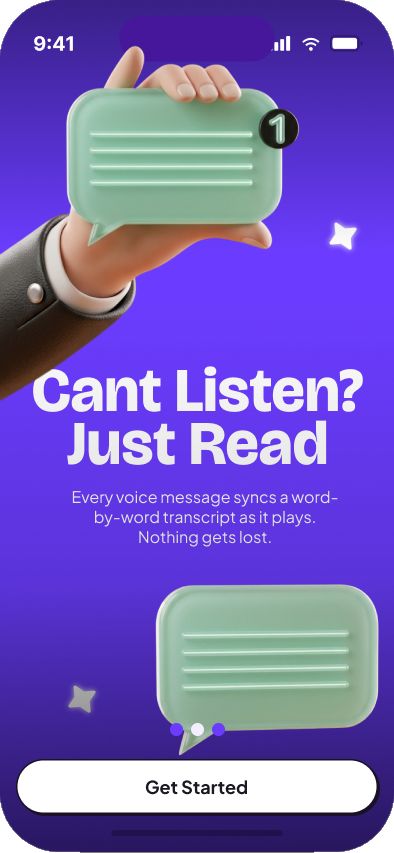
- 01
Ziggy
New users learn by doing: Ziggy walks them through a first yeapp, sticker and filter in a real chat.
- 02
Ghosties
Build a voice-bio profile for a friend who is not on Yeapp. Their invite opens with "Priya already made you on Yeapp".
- 03
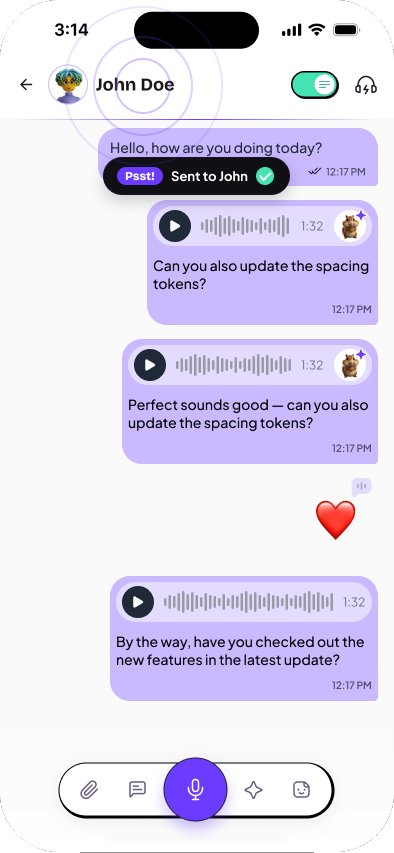
Psst
A double-tap that sends a "thinking of you" ping, for when you have nothing to say but want to say hi.
Underneath it all, a system built to be extended.
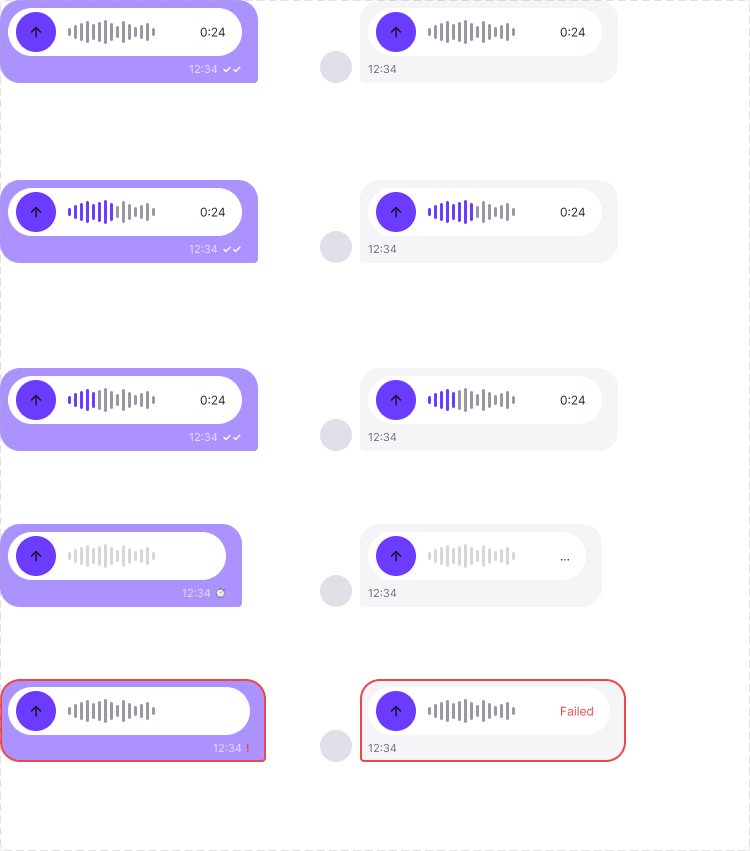
I built the component library before the scaffolding screens, so onboarding, settings and the rest went fast. The voice bubble alone has direction, playback state, a transcript and a filter; as separate variants that would have been 80 versions, so I made the options toggles and kept 10. Every colour is a variable, and the type works for both Roman and Devanagari text.
That system is what let a junior designer carry the app forward after the first release.
"We were pleasantly surprised with the speed at which the TPH team understood the problem statement and their equally impressive AI-native speed of execution. But the part that stood out the most for us was the level of end-user empathy that the team brings to the development process."
Learnings
What I would take to the next product
Don't make people choose too early
The best voice decision was letting people decide how a message goes out at the end, not the start.
Design what blocks the most code first
Locking the composer, player and voice bubble in week one kept a 45-day build from stalling.
A system is how you hand off
Toggles over variants and written decisions meant the team could keep going without me.
Final designs